
Today, while I was chatting with my relatives in my beloved grandma’s house during our family gathering, my uncle approached me and asked me about my newly published book- Datuk:
“Hey, I was thinking of buying your book on the net, I asked your aunt to help me buy it but she kept forgetting. Also, is there a version of it, which instead of us reading it, there will be a voice reading it for us while we are… I don’t know… Driving?”
“Like an audiobook?” I asked back with curiosity.
“Owh is that what they are called? Yeah! I’m not into reading. So, if you can read it, record it, then publish the recording on the net that will be great.”
Truth is, I don’t have to time to record my voice reading the whole book. So I look into the Google Book App and try to find a solution for my dear uncle.
To my surprise, there is a way! It is not perfect but definitely it helps those who don’t have the diligence to sit and read but just wish to listen to the story. And I will show you how!
When you open your Ebook on the Google Book App, when you start reading, you will be greeted with this:

Then, navigate to the upper right corner and tap on the 3 dots option button, and choose ‘Read Aloud’, simple as that!
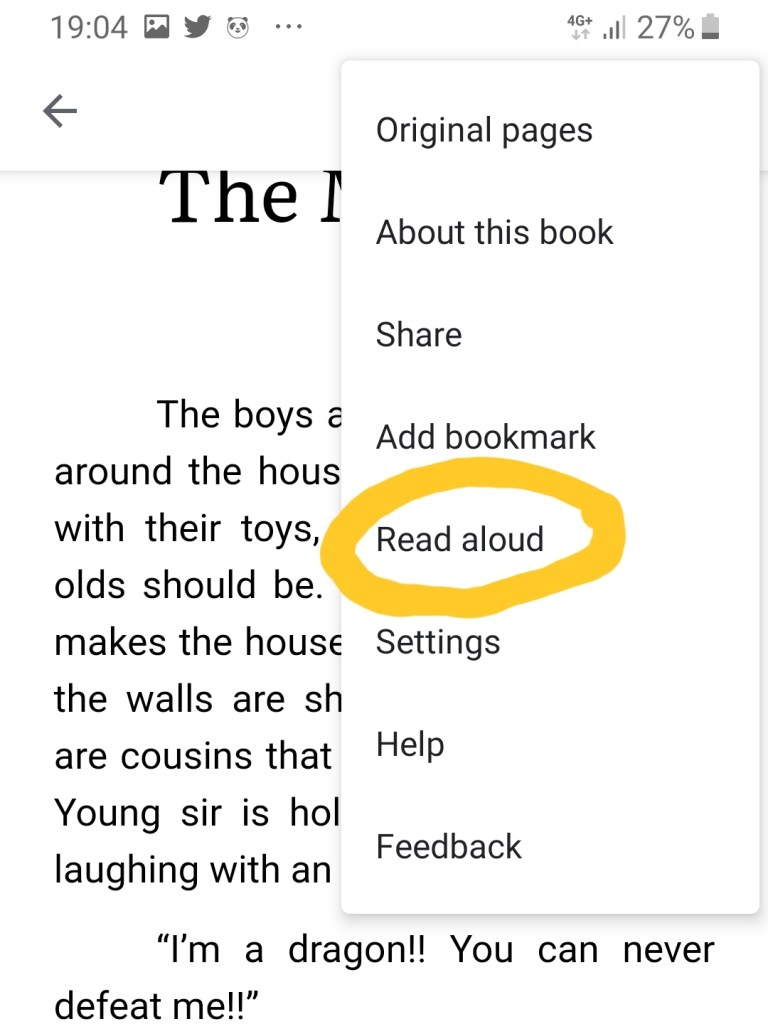
Still, this method is not perfect. As the voice is computer generated, most of us will find it monotonous, and I couldn’t find an option to change the lovely Siri-like-female voice to another, or to adjust it’s reading speed. Good thing is, the voice will re-read the sentence if it is interrupted with notifications.
Hopefully in near future, Google can add in those options for us. Hopefully too, in the future, I can publish the full audiobook version for my book. Stay tuned!
To check out my book on google, follow this link: https://play.google.com/store/books/details?id=EFryDwAAQBAJ
 Dr Vie Cheong Thong M.D.